My Work Schedule
The My Work Schedule menu provides a structured view of weekly work allocations, planned assignments, and logged work time. It functions similarly to the Dashboard's schedule section but includes the ability to switch between different weeks. This menu helps users efficiently monitor their planned versus actual work time, providing a clear view of resource allocation and work locations.
Key Features
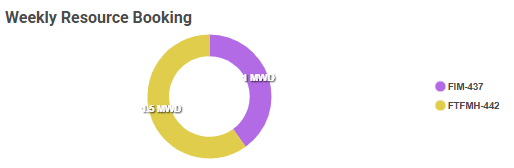
- Weekly Resource Booking – A visual representation of project allocations, displaying how many days are assigned to each project.
- Date Range Selection – Allows users to navigate between different weeks.
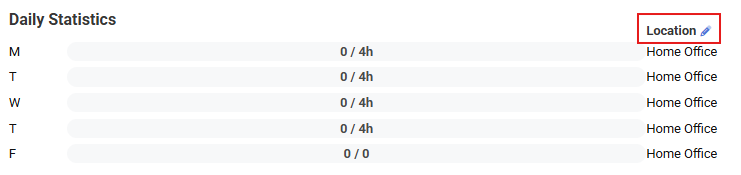
- Daily Statistics – Displays expected workdays per week and actual logged time.
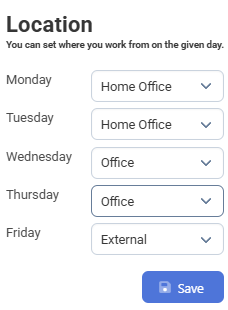
- Work Location Tracking – Indicates whether work is scheduled as Home Office or another location.
- Weekly Summary:
- Balance – Difference between expected and logged workdays.
- Days Spent with Work – Number of days worked out of the expected total.
- Logged Time – Total work time recorded for the week.
How to Use
-
Selecting a Week – Navigate between weeks using the date range selector.

-
Reviewing Weekly Resource Booking – Check the distribution of assigned work across different projects.
-
Checking Work Location – Update or verify scheduled locations (Home Office or other).
-
Analyzing Weekly Summary – Compare expected vs. logged work time.

Typical Use Cases
- Checking personal planned utilization across projects.
- Reviewing actual logged workdays vs. expected schedule.
- Tracking work location status for the week.