PTO Request Management
The PTO Requests menu provides an overview and management interface for personal Paid Time Off (PTO) requests. This menu allows users to effectively track and manage their PTO balance and request history, ensuring a clear and accurate record of leave entitlements and approvals.
Key Features
- PTO Balance Overview – Displays:
- Total annual leave
- Remaining days
- Used days
- Reserved PTO
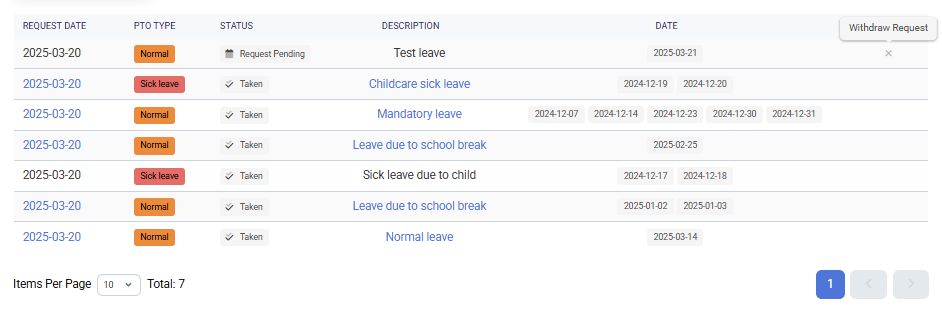
- Grid View of PTO Requests – A structured table listing all submitted leave requests.
- Detailed PTO Request Information:
- Date of Request – When the PTO request was submitted.
- Type – Categorization of the leave request (e.g., Normal, Sick Leave, Mandatory Leave).
- Status – Indicates whether the request is Used Up, Withdrawn, or Pending.
- Description – Notes provided when the PTO request was submitted.
- Requested PTO Dates – The specific days for which the leave was requested.
- Actions – Options to manage PTO requests, such as withdrawing or modifying requests (if applicable).
- Add New Request – Use this button to submit a new PTO request.
How to Use
-
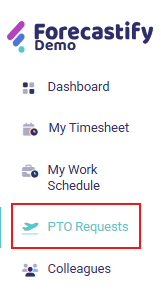
Navigate to PTO Requests Menu → Click on PTO Requests in the left-side menu.
-
Review PTO Balance → Check available, used, and reserved PTO days.

-
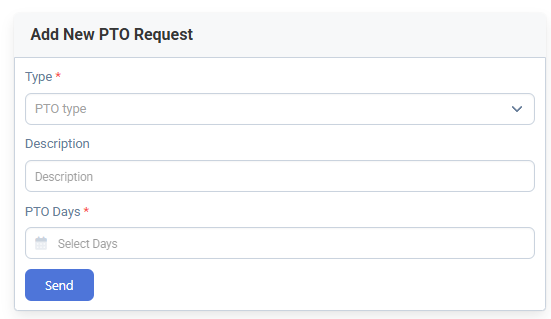
Submit a New PTO Request → Fill out the required fields (Type, Description, PTO Days) and click Send.
-
Monitor PTO Status → View the grid for request status updates.
-
Withdraw a Request → If permitted cancel a request under the Actions column.
Typical Use Cases
- Submit a PTO request – Request leave for a specific period.
- Track available PTO days – View current PTO balance.
- Cancel PTO request – Cancel a request if needed.